|
|
Create and Own Your New Custom Professional, Business or Personal Email Address Fast, Reliable Personalized Email Address Plans for You, Your Family, Your Organization or Your Business Accessible From Any Computer, Cell Phone or Tablet with Internet Access No Ads of Any Kind. Includes Strong Spam, Virus & Fraud Protection |
| 24/7 Phone Support: 480-624-2500 | Main Online Help Center Log into Your Account |
|
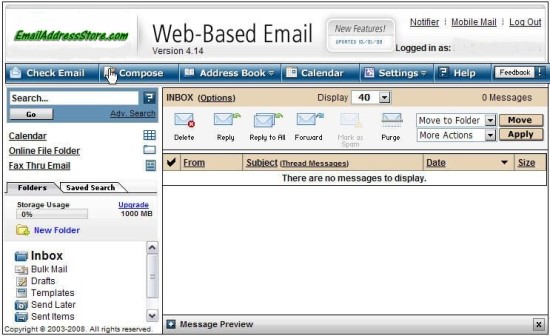
Web Mail Instructions Web Mail allows you to send and receive your email messages from anywhere using any computer connected to the internet via any ISP. Our web-based email features spam filtering, virus protection, phishing-fraud protection, autoresponder, and remote message retrieval. To access your email via the web mail function, use your internet browser such as Internet Explorer or Firefox, to go to http://email.YourDomainName. For instance, if your domain name is "MyBusinessName.com", the web address for accessing your email is http://email.MyBusinessName.com. On that page, log in using your email account name and password.
The web mail interface is easy to use... you can access functions from the menu across the top of the program. Manage your email folders from the left menu pane and organize your email messages by moving them to the appropriate folder. When you access your address book and preferences, the information displays in the main part of the window - this is to the right of the left pane and under the top menu bar. Your message list also displays in the main part of the window. Create and own a personalize email address for yourself, your family, your organization, your businesses - You @TheNameYouWant. |
|